

Cloud-Based Dash Cam Storage for Business: Complete Management Guide
A 4G dash cam with cloud storage automatically uploads onboard video to the cloud over the cellular network. Its core strengths are automatic backup, remote access, and centralized multi-vehicle management. Unlike local SD cards, there is no manual card retrieval, and footage survives device loss or card failure. Typical use cases include video evidence management for logistics fleets, ride-hailing platforms, and construction fleets.
For fleet operators, the pain point of video management has never been “we didn’t capture it” — it’s “we captured it but can’t get it out.” Cloud storage turns this manual process into an automated chain: record, upload, access anytime, manage everything in one place. This guide covers the technical chain, selection criteria, cost estimation, and day-to-day management, so you can judge whether a cloud storage plan matches your fleet size and budget.
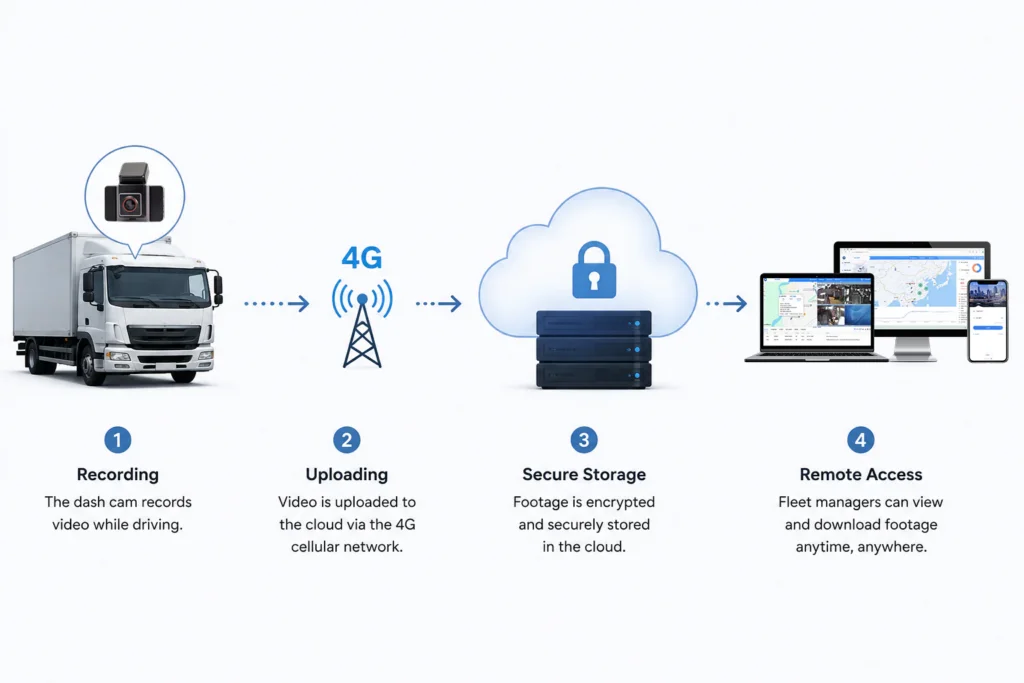
One 4G upload chain: record → upload → encrypted storage → remote retrieval
Two upload strategies: event-triggered uploads save data, continuous uploads keep full coverage
Three cost variables: capacity, retention period, and device count
One capacity formula that calculates monthly fleet usage in 30 seconds
How Cloud Storage Works for 4G Dash Cams
Moving video from the vehicle to the cloud involves four stages: recording, uploading, storage, and access. If any stage is poorly designed, critical footage may be unavailable exactly when you need it — this is the first checkpoint in evaluating a cloud solution.
The chain works like this: the onboard camera records video → uploads it in real time or in batches over the 4G cellular network — the cellular cloud backup that keeps evidence reachable anywhere → the cloud server stores it encrypted → fleet managers retrieve it remotely from a computer or phone. The biggest difference from traditional local storage is that the “home” of your video moves from the vehicle to the server, and management changes from “driving to the fleet” to “opening a dashboard.”
Tips:For reference only, actual situation needs to be inquired → →
| Upload Strategy | Trigger | Best For | Data Usage | Evidence Coverage |
|---|---|---|---|---|
| Event-triggered upload | Collision, hard braking, abnormal vibration | Fleets focused on incident evidence | Low | Covers key events |
| Continuous upload | Real-time upload at all times | Fleets requiring full-time monitoring | High | Complete, no gaps |
| Batch upload at parking | Bulk upload after parking | Areas with unstable signal | Medium | Delay window exists |
For example, at 1080P resolution with a 4Mbps bitrate, continuous upload consumes about 1.8GB of data per hour. Event-triggered upload transmits only key clips and typically uses less than one-tenth of that. Decide first whether your fleet is “evidence-focused” or “monitoring-focused,” then choose the strategy — otherwise you will either blow the data budget or have no video at the critical moment.
What to Look for in a Cloud Dash Cam for Business
When choosing the best cloud dash cam for business, your day-to-day storage experience is largely set at the moment of purchase. However long the feature list runs, four indicators really decide cost and usability.
Storage capacity and retention period: capacity decides how many days of footage you can keep; retention period decides whether the evidence window covers accident disputes. We recommend at least 30 days to cover insurance claims and legal processes.
Upload strategy and data quota: match data allowance to actual driving hours so you don’t overrun at month-end or lose uploads during the day.
Video quality and compression: newer codecs like H.265 keep longer history in the same capacity — the most direct way to “save storage.”
Multi-user permissions: admins, dispatchers, and drivers see different data views, preventing the chaos of one account managing every vehicle.
Cloud Storage Plans and Pricing for Business Dash Cams
Dash cam cloud storage cost has no one-size-fits-all price. It is driven by three variables: capacity, retention period, and device count. Put the formula on the table, and it becomes clear where the budget goes — and where it can be saved.
| Pricing Factor | Impact on Cost |
|---|---|
| Storage capacity | Sets the base plan tier |
| Retention period | Longer retention, higher per-device cost |
| Device count | Fleet size drives total usage and bargaining room |
| Feature modules | Add-ons such as AI analytics, multi-user, open APIs |
| Bandwidth | Continuous upload is the biggest data cost |
Five factors determine the final quote: storage capacity, retention period, device count, feature modules (AI analytics, multi-user, open APIs), and bandwidth. Clarify each one so no vendor can hide data or feature costs behind a bare “package price.”
For plan tier design, see our dedicated guide on 4G dash cam subscription plans.
Since actual cost and billing vary significantly with fleet size, tell us your fleet size and daily driving hours, and we will prepare an estimate based on real usage.
To be clear, cloud storage is not right for every fleet. Small fleets with low annual mileage and single-vehicle operation are better served by local SD cards. The marginal value of cloud storage shows up for operators with dispersed vehicles, frequent accident disputes, and remote management needs.
For the full product picture, start with our 4G dash cam product line.
Managing Cloud Storage Across Your Fleet
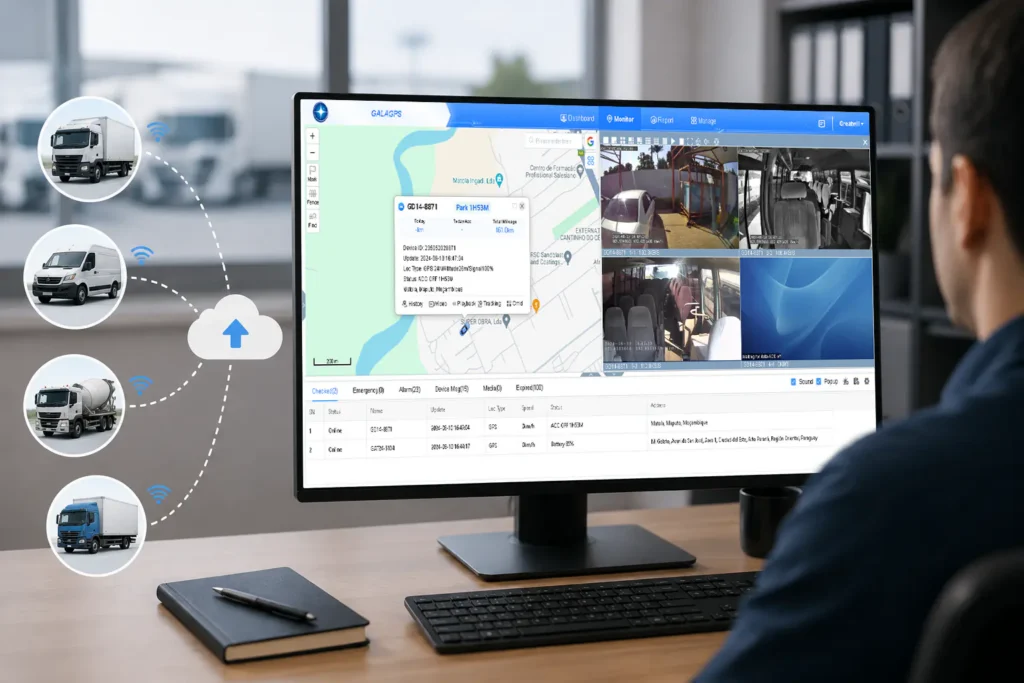
Managing one vehicle is an operational task; managing one hundred is a system problem. Once your fleet scales, the capability of the management platform directly determines operational efficiency.
A mature fleet cloud storage platform should cover at least four scenarios:
Centralized multi-vehicle management: device status, online state, and remaining storage all on one view.
Event search and export: filter by time, vehicle, and event type; pull up footage within minutes when a dispute occurs.
Role-based permissions: manage, view, and export rights assigned by role.
Data interfaces: connect stored data to your existing dispatch or management systems.
Open platform capabilities let cloud storage data plug directly into your own workflows instead of being locked into a single vendor’s dashboard. For operators needing custom development or deep integration, we recommend GreatWill 4G Linux dash cam.
Data Security and Compliance for Fleet Video
Once video enters a dispute or compliance process, the security level of your storage is your risk resistance. This single factor decides whether a cloud solution works long term.
When evaluating a vendor’s security capability, focus on four things:
Encrypted transmission and storage: HTTPS in transit and AES-level storage encryption are the baseline.
Selectable storage location: local storage options matter for data sovereignty and cross-border compliance.
Transparent retention and deletion policy: put the auto-cleanup cycle for expired footage into the contract.
Access logs: who viewed which clip and when must be traceable.
When fleet video involves personal information, we also recommend confirming local video data storage requirements with your legal team.
Need a cloud storage estimate for your fleet? Tell us your fleet size, device count, and daily driving hours, and we will deliver capacity planning and a quote based on actual usage — no preset plans. →
FAQ
Is the monthly data allowance enough for 4G dash cam cloud storage?
It depends on your upload strategy and video bitrate. At 1080P with a 4Mbps bitrate, continuous upload consumes about 1.8GB per hour, while event-triggered upload only sends clips on hard braking, collisions, or abnormal parking — typically less than one-tenth of continuous usage. Decide whether your fleet needs evidence-based recording or full-time monitoring, then match the plan to your data budget.
How long is cloud video retained?
Retention is set by the plan and typically ranges from 7 to 90 days. For accident disputes, we recommend at least 30 days to keep an evidence window for insurance claims and legal processes. For longer periods, use a combination of local backup plus cloud archiving.
Can local SD cards and cloud storage be used together?
Yes — in fact, it is the most common fleet configuration. The local card keeps recording uninterrupted when there is no network, while the cloud ensures remote access and off-site backup; the two back each other up. Our 4G dash cams support dual storage: SD card loop recording keeps capture continuous, and cloud upload keeps footage remotely retrievable.
Can cloud-stored video be used as insurance claim evidence?
Yes. Cloud video carries timestamps and vehicle information watermarks, meeting most evidence requirements for insurance claims and liability determination. Choose a solution with tamper protection and encrypted storage, and lock and export the original file from the platform as soon as an accident happens.
Related Reading
Pair real-time monitoring with cloud storage: How 4G Live Streaming Dash Cams Transform Real-Time Fleet Monitoring → https://greatwilliot.com/4g-dash-cams-commercial-truck-fleets/
Compare plan tiers and data costs: 4G Dash Cam Subscription Plans: Complete Pricing Guide for Business
Meet security and compliance requirements: 4G Dash Cam Data Security and Compliance: Guide for Business Fleets →
https://greatwilliot.com/4g-dash-cam-data-security-compliance/
Plan installation and wiring: Professional 4G Dash Cam Installation for Fleets: Complete Guide →
https://greatwilliot.com/professional-4g-dash-cam-installation/
Get the fleet management overview: 4G Dash Cam Fleet Management: A Complete Solution Guide




Responses
Discussion
0 responses
No responses yet
Start the discussion with a practical question or field note related to this article.