
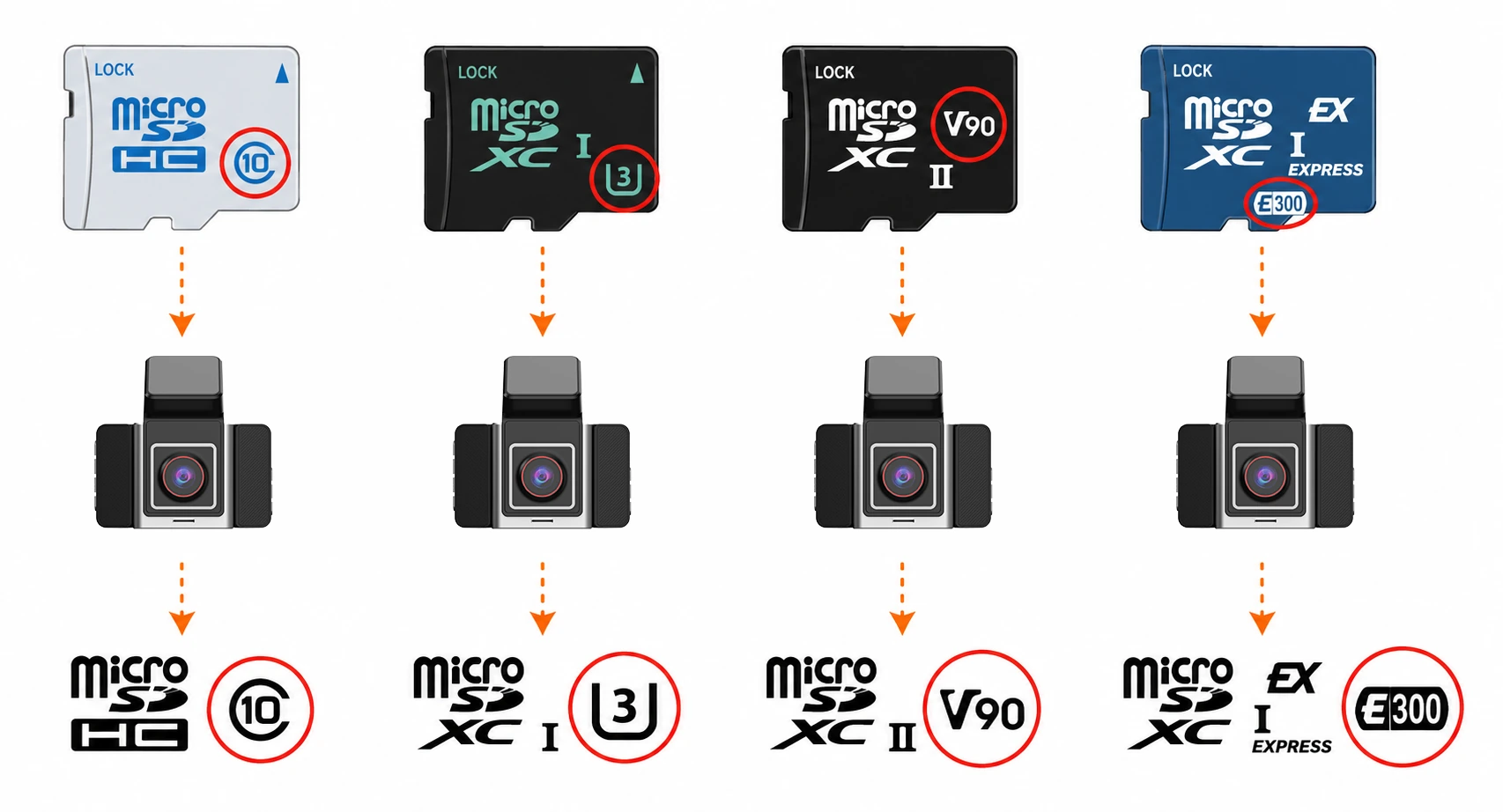
Short answer: Class 10 can be enough for a single-channel dash cam recording a moderate-bitrate stream, especially 1080p, when the camera manual accepts Class 10. It is not a safe default for 4K, multi-channel, high-bitrate or long-parking recording. C10 represents a 10 MB/s minimum write-speed class under the SD Association’s testing conditions. That equals 80 Mbps of raw write capacity, but the camera still needs operating margin for file-system overhead, event clips, temperature changes and card wear.
For procurement, use this rule: calculate the total local recording bitrate, convert it to MB/s, compare it with the required card class, and then validate the exact card with the exact camera and firmware. Do not approve a card because its advertised read speed is high or because it carries an A1/A2 label.
Can a Class 10 card work in a dash cam?
Yes, for some configurations. No, as a universal recommendation.
C10 is a reasonable starting point when all of the following are true:
- The dash cam manual lists Class 10 or a 10 MB/s class as the minimum.
- The card is used for one low-to-moderate bitrate recording stream, such as many 1080p configurations.
- The calculated sustained write demand remains comfortably below 10 MB/s, with margin for recording overhead and event-file activity.
- The camera supports the card’s capacity, file system and bus mode.
- A long continuous-recording and loop-overwrite test shows no dropped frames, recording gaps, corrupted files or card errors.
C10 should not be treated as sufficient by default when the camera records several channels, uses a high bitrate, records 2K or 4K video, or keeps parking footage for long periods. In those cases, the combined stream may approach the class limit, and a higher class may be required. The camera specification remains the first authority.
Why the speed class matters during continuous recording
A dash cam writes video for hours and repeatedly replaces older files. That is different from copying a file to a computer, where a short burst of high speed may look acceptable.
If the card cannot sustain the camera’s write load, the symptoms may include:
- dropped frames or missing sections of video;
- recording gaps after loop files are created;
- damaged or unreadable event files;
- card-error messages or repeated formatting prompts;
- failure after the card becomes warm or after many overwrite cycles.
The required write load depends on the local recording settings, not only the headline resolution. Check the actual resolution, frame rate, bitrate, codec, number of active cameras, event-file behavior and whether the camera writes separate streams at the same time.
What C10, U1, U3, V10 and V30 mean
The SD Association defines several speed-class systems. Their minimum performance figures are useful for comparison, but the symbols are not interchangeable product guarantees.
| Marking | Class system | Minimum write class | Practical dash cam meaning |
|---|---|---|---|
| C10 | Speed Class | 10 MB/s | Can cover a compatible single-stream workload below the limit. Not a default choice for high-bitrate or multi-channel recording. |
| U1 | UHS Speed Class | 10 MB/s | Similar minimum class figure to C10, but the host and card must support the relevant UHS conditions. |
| U3 | UHS Speed Class | 30 MB/s | Provides more write headroom than C10/U1 for compatible higher-bitrate configurations. |
| V10 | Video Speed Class | 10 MB/s | Video-oriented 10 MB/s class. It still must match the camera’s supported class and workload. |
| V30 | Video Speed Class | 30 MB/s | Useful for compatible higher-bitrate recording, but it does not override a camera’s capacity, bus or firmware limits. |
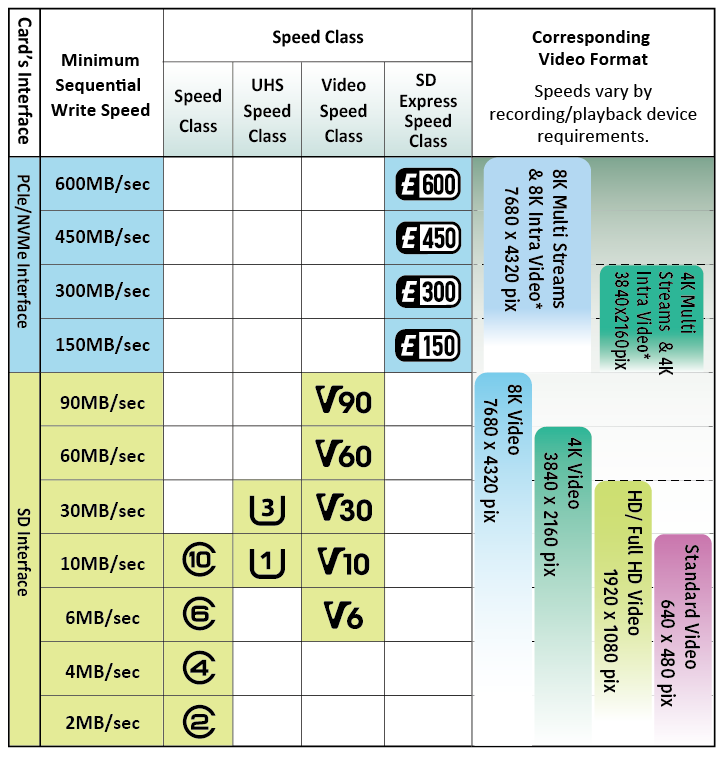
The figures are minimum class values under the relevant standards. They are not promises that every card will sustain the same speed in every dash cam, at every temperature, throughout its service life.
See the SD Association Speed Class reference for the class definitions and the SD Association card-choice guidance for the difference between speed and application-performance markings.
C10 vs U1: are they enough for the same dash cams?
At the class-number level, C10 and U1 both indicate a 10 MB/s minimum write class. That does not mean any C10 card and any U1 card will behave identically in a particular camera.
For a single-channel 1080p camera with a manual requirement of Class 10 or U1, either marking can be acceptable if the card is genuine, supported by the host and stable during continuous recording. For a multi-channel or high-bitrate camera, neither marking should be approved simply because it says 10 MB/s. Calculate the combined bitrate first and follow the camera manufacturer’s stated requirement.
C10 vs U3 and V30: when should you move to 30 MB/s?
Choose the 30 MB/s class, such as U3 or V30, when the camera specification requires it or when the configured recording load needs the additional headroom. This is more relevant to high-bitrate 2K/4K recording, multiple local camera streams and systems that write several files at once.
U3 and V30 are comparable at the 30 MB/s minimum-class level, but they are not automatically interchangeable. Check the camera’s supported symbols, host bus mode and firmware. If the manual says “U3 required,” do not assume that a V30 card is approved unless the manufacturer also accepts V30 or the exact combination has passed validation.
A higher class does not fix an unsupported card format, a capacity limit, a poor-quality NAND supply or a dash cam with an incompatible controller.
How to calculate the recording load
Add the bitrates of all streams written to the card. Then divide by eight to convert megabits per second to megabytes per second.
Total write demand (MB/s) = sum of local recording bitrates (Mbps) ÷ 8
For example, three camera channels configured at 8 Mbps each produce:
(8 + 8 + 8) Mbps ÷ 8 = 3 MB/s
That calculated video payload is below the 10 MB/s C10 class figure. It does not automatically approve the card. File-system operations, event locking, metadata, fragmented files, thermal conditions and card aging still require margin, and the camera manual may specify a higher class for reasons the bitrate calculation does not capture.
Use the local recording bitrate, not the remote live-view bitrate. A connected dash cam may send a compressed sub-stream to the platform while saving a higher-bitrate main stream to the SD card.
Why resolution alone does not answer the question
Two cameras can both be described as 1080p and still write different amounts of data. Frame rate, codec, image complexity and the configured bitrate change the storage load. A three-channel 1080p system can also write more data than a single-channel 4K system if its combined bitrate is higher.
H.265 can reduce the bitrate needed for a similar image quality, but the camera’s configured bitrate is the number to use for card approval. Do not infer the write load from the codec name alone.
A1 and A2 do not answer the video-recording question
A1 and A2 are Application Performance Class markings. They describe application-oriented random and sequential performance under specified test conditions. They are not a substitute for a video speed class, an endurance rating or a dash cam compatibility test.
A card marked A2 can still be a poor choice for continuous vehicle recording if its sustained write behavior, endurance, temperature performance or host compatibility is unsuitable. For dash cams, check the required video class first. Treat A1/A2 as secondary information unless the device also runs applications from the card.
How to approve an SD card for a dash cam
1. Start with the camera manual
Record the minimum speed class, maximum capacity, supported file system, bus mode, approved brands or models and any high-endurance requirement. If the manual specifies U3 or V30, do not downgrade to C10 because the calculated bitrate appears low.
2. Calculate the local write load
Use the actual bitrate and count every camera stream written to the card. Include parking recording, audio, event files and any secondary stream that is stored locally. Compare the result with the required class and leave operating margin.
3. Check capacity and file-system support
Confirm the maximum supported capacity and whether the camera expects FAT32 or exFAT. A card can meet the speed class and still fail because its capacity or file system is outside the camera’s supported range.
4. Test the exact card and firmware combination
For fleet or OEM approval, test the same card model and capacity that will be purchased. Use the production firmware and all active channels. Run continuous recording long enough to create and overwrite multiple loop files. Check playback, event locking, file export, recovery after power interruption and operation at the expected vehicle temperature.
What fleet buyers should check beyond the speed symbol
Fleet cameras can write and overwrite cards every day. The procurement decision should therefore include:
- continuous-write stability;
- endurance under repeated loop recording;
- operating-temperature range;
- card authenticity and batch consistency;
- capacity and file-system support;
- recovery after sudden power loss;
- warranty, replacement supply and approved sourcing channels.
“High endurance” is useful for this workload, but it is not a complete approval standard. Approve the card at the device level, especially for multi-channel, high-bitrate and long-parking deployments.
Common mistakes in dash cam SD card selection
- Using read speed as the main criterion: read speed affects transfers and playback access; it does not prove stable continuous writing.
- Assuming C10 is always enough: C10 is a 10 MB/s class, not a universal dash cam approval.
- Using A1 or A2 as a video rating: application performance does not establish recording endurance.
- Comparing only the number: U3 and V30 both indicate a 30 MB/s class, but host support and device requirements still matter.
- Ignoring all camera channels: the card must absorb the combined local write load.
- Ignoring capacity and file system: speed compatibility does not guarantee that the camera will recognize the card.
- Skipping long-duration testing: a short preview or file-copy test does not prove loop-recording reliability.
- Removing the card while powered: hot removal can corrupt the file system and event files.
GreatWill fleet SD card approval checklist
- Camera manual’s required speed class
- Actual local bitrate for every active channel
- Frame rate, codec and recording mode
- Required operating margin above the calculated payload
- Supported capacity, bus mode and file system
- High-endurance requirement for repeated overwriting
- Continuous recording and loop-overwrite results
- Event-lock, playback and file-export results
- Power-loss recovery results
- Temperature test results
- Authenticity, warranty and replacement plan
If you are evaluating a dash cam for a fleet, OEM or ODM project, review the camera’s storage, video and platform requirements together with GreatWill’s dash cam OEM solutions. The correct card is determined by the camera’s supported class and actual recording configuration, not by the card label alone.
Conclusion
C10 is enough for a compatible, moderate-bitrate single-stream dash cam when the manual accepts Class 10 and the calculated write demand stays below the class limit with practical margin. It is not a safe default for multi-channel, high-bitrate, 2K/4K or long-parking recording.
Use U3 or V30 when the camera requires the 30 MB/s class or when the recording configuration needs more write headroom. Treat A1/A2 as application-performance labels, not video-recording approval. Before a fleet purchase, test the exact card, camera, capacity and firmware through continuous recording and loop overwriting.
Sources and standards
- SD Association: Speed Class
- SD Association: SD Memory Card Choices
- SD Association: Downloads and simplified specifications
Is Class 10 enough for a dash cam?
Sometimes. C10 can be sufficient for a single-channel, moderate-bitrate configuration when the camera manual accepts Class 10 and the total local write demand stays below 10 MB/s with operating margin. It is not a safe default for multi-channel, high-bitrate, 2K/4K or long-parking recording. For those systems, follow the manual’s U3/V30 or higher requirement and test the exact card and firmware.
What type of dash cam can use a C10 card?
A compatible single-stream camera with a moderate local bitrate can use C10. Many 1080p configurations fall into this range, but resolution alone is not enough to approve the card. Check the actual bitrate, capacity limit, file system and manufacturer requirement.
When is C10 not enough?
Do not use C10 as the default when the camera records multiple local channels, high-bitrate 2K/4K video, or demanding parking footage, or when the manual requires U3, V30 or a higher class. A total write demand near the 10 MB/s class limit also leaves too little margin for reliable fleet use.
Are U3 and V30 the same for a dash cam?
They both indicate a 30 MB/s minimum class level, but they belong to different SD standards. They can be treated as equivalent only when the camera supports the selected marking or the exact card and device combination has been validated. A V30 label does not automatically satisfy a manual that specifically requires U3.
Is U3 better than V30?
Neither is universally better. Choose the marking named by the camera manufacturer. If both are supported, compare the exact card’s endurance, capacity, temperature rating, supply authenticity and test results rather than choosing by the symbol alone.
Does A2 mean a card is suitable for continuous dash cam recording?
No. A2 describes Application Performance Class behavior. It does not by itself confirm sustained video writing, overwrite endurance, temperature performance or compatibility with the dash cam.
How do I calculate whether a card is fast enough?
Add the bitrates of every stream written locally and divide by eight. For example, three 8 Mbps streams equal 3 MB/s of video payload. Compare that figure with the camera’s required class, leave margin for file operations and event recording, then validate the exact card through long continuous recording and loop overwriting.
What should fleet operators test before buying SD cards in bulk?
Test the exact card model and capacity with the production camera firmware. Run all active channels through continuous recording and multiple loop overwrites. Check event locking, playback, file export, sudden power-loss recovery and the expected vehicle temperature range.



Responses
Discussion
0 responses
No responses yet
Start the discussion with a practical question or field note related to this article.